Start with the mechanism
Understand the failure before changing CSS
Mobile content can disappear for two fundamentally different reasons. A shell sized with an unsuitable viewport unit can extend below the currently visible region, or content can occupy valid document space but be covered by a sticky or fixed interface. Both look like missing content, yet the measurements and fixes are different.
Treat the viewport boundary and overlay geometry as explicit data. For height clipping, compare the shell content height with the chosen visible-height model and disclose what the test can reproduce. For obstruction, compare the focused target rectangle with the sticky header bottom or fixed banner top. A z-index change cannot create missing space, and a viewport-unit change cannot repair an overlay that covers focus.
Decision routes
Choose the route that matches the measured signal
These branches describe different ownership boundaries. Follow the signal that matches the page, then open the linked fixture to compare a controlled failure with its smallest verified correction.
Sticky header covers a focused target
- Visible signal
- Anchor navigation or keyboard focus succeeds, but the target begins underneath a sticky header at the top of the scrollport.
- Likely mechanism
- Scrolling aligns the target to an edge without accounting for the persistent header that occupies visual space above it.
- Next measurement
- Measure header.bottom against target.top and apply an intentional scroll offset such as scroll-margin-block-start at the target boundary.
Fixed bottom control covers the final task
- Visible signal
- The document reaches its end, but a bottom banner overlaps the last focused control and there is not enough scrollable space to move it above the banner.
- Likely mechanism
- The fixed element is removed from normal flow, so content does not automatically reserve its height.
- Next measurement
- Measure banner.top against target.bottom and reserve sufficient content-end space for the real banner height and supported viewport states.
Full-height shell exceeds the visible region
- Visible signal
- A panel sized as a full viewport appears complete in one state but its final content extends below a smaller visible-height state.
- Likely mechanism
- The selected viewport unit represents a height larger than the space currently available to the content.
- Next measurement
- Choose a viewport unit based on whether the component must fit the smallest, current dynamic, or largest viewport, and provide scrolling when content can exceed it.
Numbers before conclusions
Measurement reference
Use the same measurements before and after a change. A fix is credible when it improves the intended boundary without making content or controls less reachable.
After anchor navigation or keyboard focus, compare target.top with header.bottom and target.bottom with overlay.top.
The focused target and its visible focus indicator remain completely inside the unobstructed region.
Compare the full-height shell content box with the viewport model selected for the component.
Essential controls fit the promised visible region or remain reachable through an intentional internal scroll area.
Measure the fixed bottom layer, supported safe-area inset, and the scrollable space below the final interactive target.
The final target can scroll fully above the overlay in portrait, landscape, zoomed, and expanded-text states.
Repeatable method
Inspection workflow
- 01
Reproduce with a focused target
Use a real link, button, or form control near the affected boundary. Visual inspection without focus can miss an obstruction that blocks keyboard users.
Keep: Record the active element and its rectangle after navigation or focus.
- 02
Measure the relevant boundary
For top and bottom overlays, record both rectangles and their overlap. For height clipping, record client height, content height, and the selected viewport model.
Keep: Store numbers that can be asserted instead of relying only on screenshots.
- 03
Classify flow participation
Determine whether the obstructing element is sticky, fixed, or in normal flow. Confirm whether the hidden target is in document space or beyond the visible-height boundary.
Keep: Record computed position and the nearest scrolling container.
- 04
Reserve or offset at the owner
Add scroll offset for target alignment, content-end space for a fixed bottom layer, or an appropriate viewport sizing and overflow contract for a full-height shell.
Keep: Verify the correction with the same target and geometry used for the failure.
- 05
Retest mobile state changes
Check portrait, landscape, keyboard focus, text expansion, and supported browser viewport states. Fixed assumptions about banner or translated text height require separate validation.
Keep: Keep representative narrow and landscape screenshots plus focus and overlap assertions.
What controlled fixtures reveal
Field notes
These details are easy to miss when a page is checked at only one width or with idealized content. They turn the guide into a repeatable review rather than a one-off patch.
Use focus as a geometry probe
A target can exist in the document and still be unusable because focus lands beneath a persistent layer.
Apply: Include anchor activation and sequential keyboard focus in every overlay regression, not only screenshot comparison.
Safe areas are an additional input
A device inset does not replace the height of a product banner, and a banner height does not automatically include the inset.
Apply: Model both values explicitly where supported and verify the composed content-end spacing.
Text can change overlay height
Consent copy, validation messages, and translated controls may wrap into more lines than the fixture default.
Apply: Test the longest supported content and 200% zoom before treating a fixed offset as a reliable contract.
Do not trade one defect for another
Common misfixes
Raise or lower z-index
Stacking order decides which layer paints on top but does not reserve space or keep the target visible.
Use instead: Measure the obstruction and create a scroll offset or content inset that matches the interaction contract.
Replace every 100vh with one viewport unit
svh, lvh, and dvh represent different promises. One substitution cannot satisfy every full-height component or browser state.
Use instead: Choose the unit from the component requirement and retain overflow for content that can grow.
Add a fixed padding value without measuring the overlay
Translations, zoom, safe-area insets, wrapping, and configuration can make the production overlay taller than the fixture value.
Use instead: Tie reserved space to a controlled component size or measured custom property and test the supported content variants.
Before publishing the component
Release checks
- Focused targets remain fully visible below sticky headers and above fixed bottom layers.
- The final control can scroll clear of a bottom overlay.
- Full-height shells expose all essential content in supported viewport states.
- Portrait, landscape, zoom, and expanded text have been checked.
- Overlay controls retain logical keyboard order and visible focus.
- Viewport simulations clearly disclose their limits and do not claim to reproduce browser chrome.
Project-owned fixtures
Verified Mobile Viewports & Overlays cases
Each case includes a failing and fixed fixture, exact CSS or script diff, current-browser measurements, and a three-browser evidence manifest.
Prevent Sticky Headers From Hiding Anchor Targets
A sticky 56-pixel header covers a focused jump target after scroll positioning, so keyboard users cannot see the control or its focus indicator.
Stop Fixed Bottom Banners From Covering Focused Content
A persistent 72-pixel bottom banner covers the final focused action after end-aligned scrolling, leaving the control and its focus indicator unavailable to keyboard users.
Choose Viewport Height Units Without Hiding Mobile Content
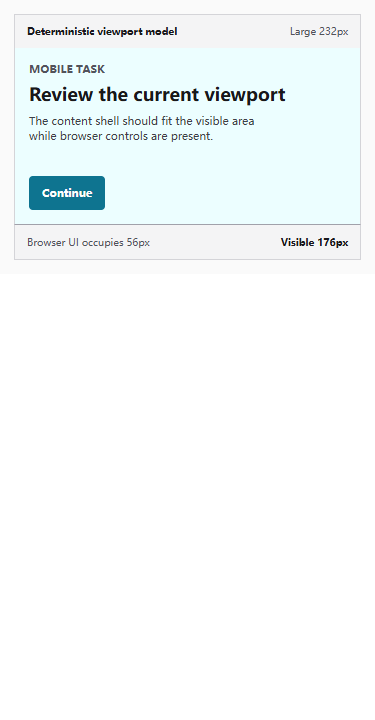
A full-height shell sized to a larger viewport can extend 56 pixels below the currently visible area when browser controls occupy part of the screen.
Source boundary
Primary references used by these cases
The guide summarizes project measurements. Normative behavior and accessibility requirements remain linked to the primary sources reviewed for each case.
- Understanding Success Criterion 2.4.11: Focus Not Obscured (Minimum)W3C Web Accessibility Initiative · checked 2026-08-04
- F110: Sticky content completely hiding focused elementsW3C Web Accessibility Initiative · checked 2026-08-04
- CSS Scroll Snap Module Level 1 - scroll-marginW3C · checked 2026-08-04
- C34: Using media queries to un-fix sticky headers and footersW3C Web Accessibility Initiative · checked 2026-08-04
- CSS Values and Units Module Level 4 - viewport-relative lengthsW3C · checked 2026-08-04
- CSS Working Group - new viewport units in Values and Units Level 4W3C CSS Working Group · checked 2026-08-04